New Table Widget with NEKO360

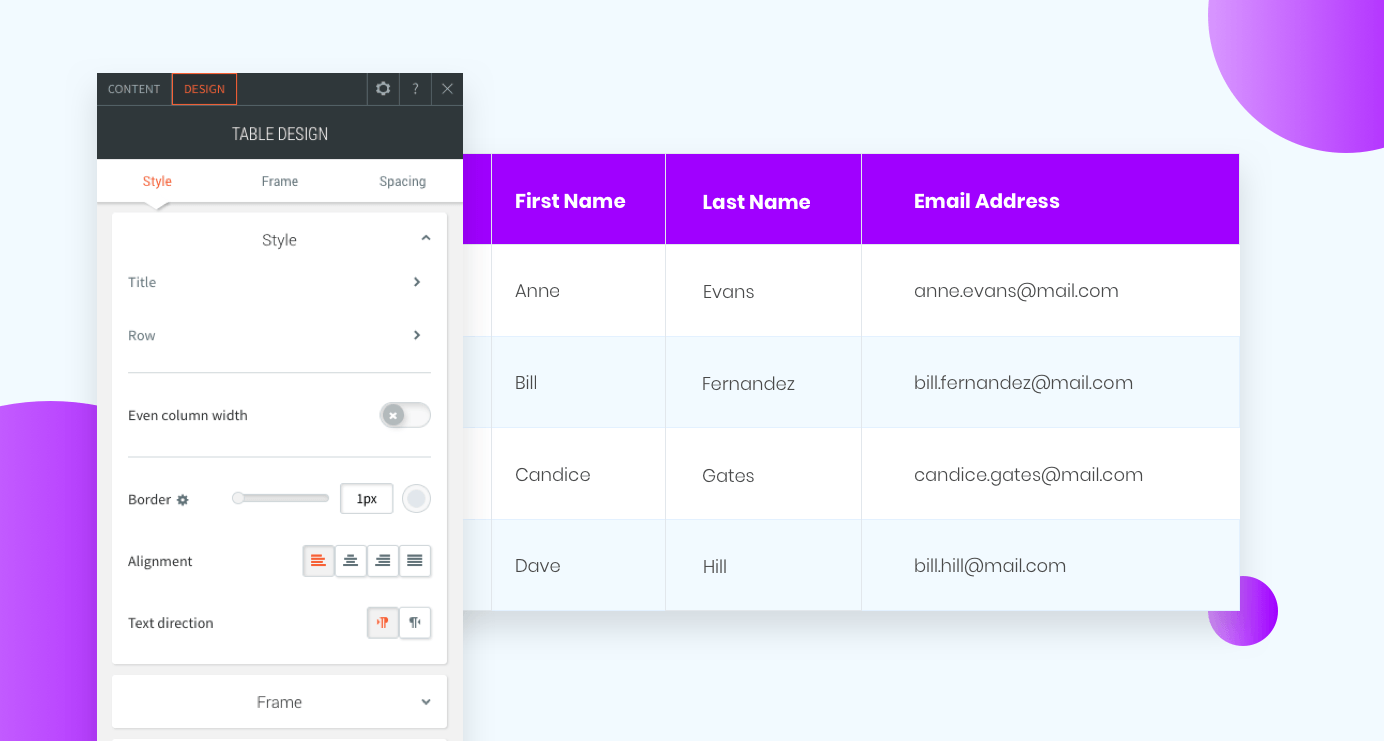
The new table widget is a great new tool for displaying information on your sites. Show contact info, ingredients, branch locations, program events and more in a manner that’s attractive and easy to understand.
New table widget is available with NEKO360 at Northeast Kingdom Online in Vermont.

The table widget is easy to set up and design, so you can display information effectively. Add the widget to your site and then add content manually or via CSV and customize the font style and colors for the header, even rows and odd rows.

This widget looks fantastic on mobile, and comes with three mobile layouts:

  • Scroll is excellent for large tables with several columns and rows.
  • Squish is great for tables with just 2 or 3 columns.
  • Collapse is good for tables with relatively few rows.

How to edit the new table widget for mobile with NEKO360 at Northeast Kingdom Online in Vermont.

Here are some great table widget examples:

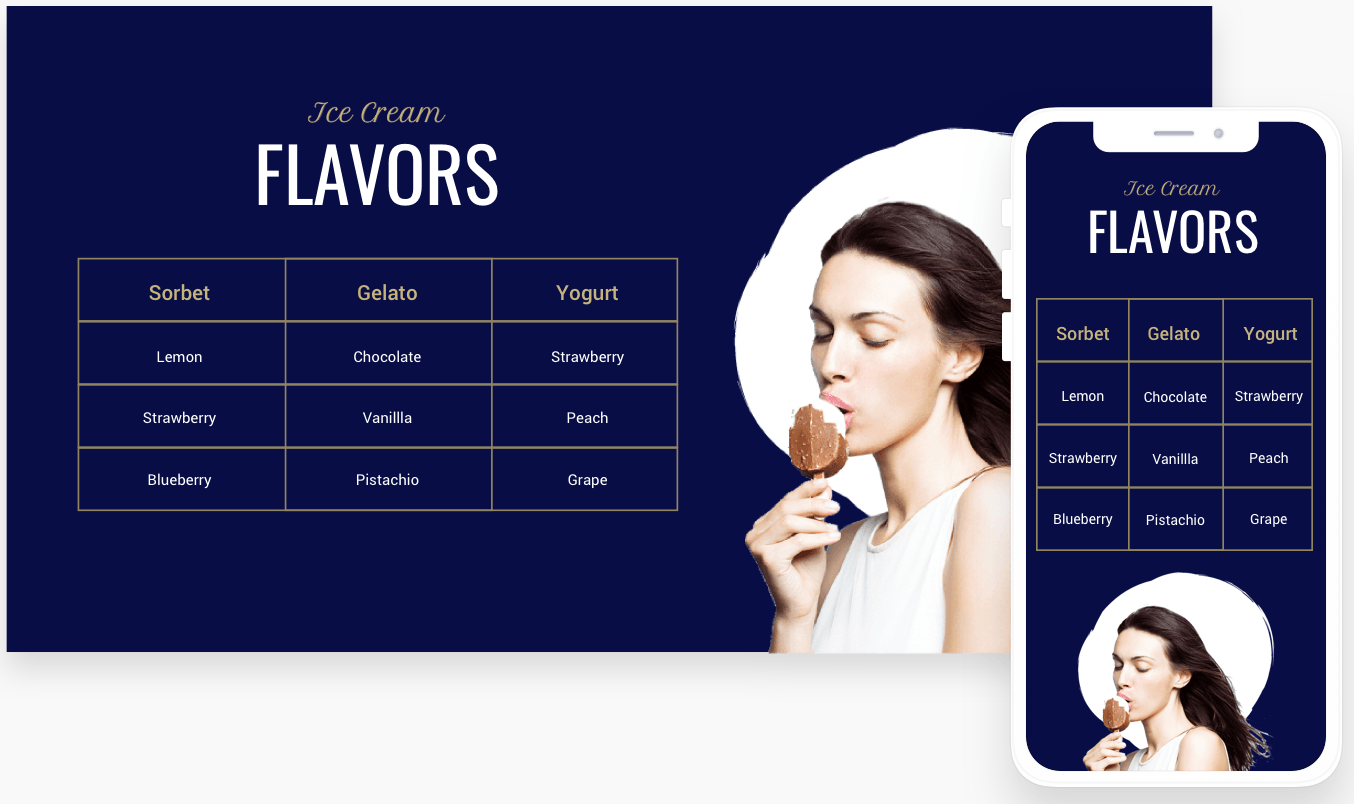
Menu Items
New table widget is available with NEKO360 at Northeast Kingdom Online in Vermont.

How to build this table in your site:

  1. Add a row with 2 columns and set the row background color to blue.
  2. In the right column, add an image widget. Choose an image with a transparent background (PNG).
  3. In the left column, add 3 widgets: text, title and table. Add your content to the table.
  4. Set the header and row background color to transparent. Set the header font color to beige
  5. Set the even and odd row backgrounds to transparent and the font color to white.
  6. Set even column widget, the border to beige, and the alignment to center.
  7. For mobile, set the layout to Squish.

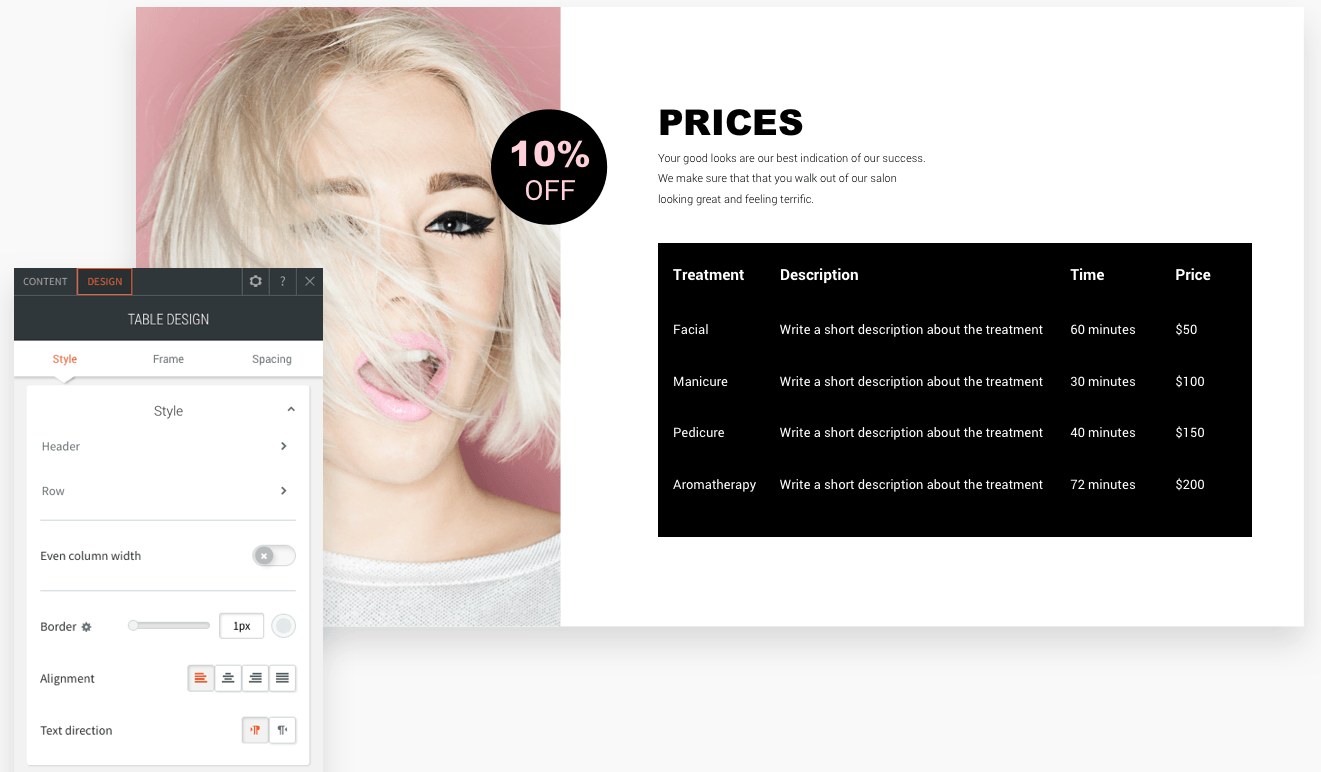
Product Descriptions
New table widget is available with NEKO360 at Northeast Kingdom Online in Northern Vermont.

How to build this table in your site:

  1. Add a row with 2 columns.
  2. In the left column, add an background image and set the position to cover.
  3. In the right column, add 4 widgets: shape, title, text and table. Add your content to the table.
  4. Set the header and row background color to black.
  5. Set the header and row color to white.
  6. Remove the border (set it to 0px) and set the alignment to left.

Contact Details
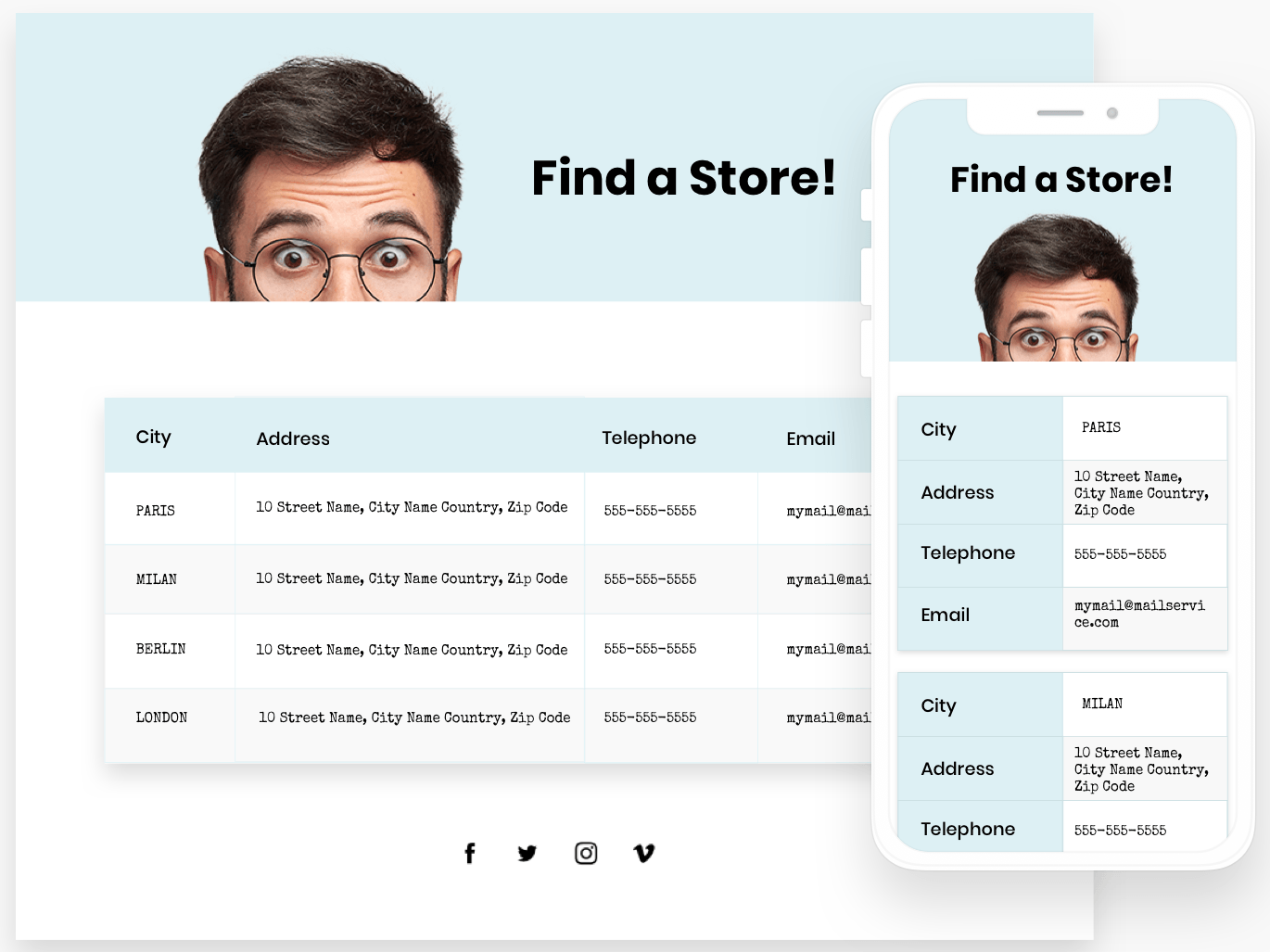
New table widget is available with NEKO360 at Northeast Kingdom Online in Vermont.

How to build this table in your site:

  1. Add 2 rows. In the first row, add a background image and title widget.
  2. In the second row, add a table widget. Add your content to the table.
  3. Set the background color of the header to light blue and set the text to bold and black.
  4. Set the even row background color to white and the odd row background color to gray. Set the text to black.
  5. Set the border to gray and the alignment to left. Turn on the frame shadow.
  6. For mobile, set the layout to Collapse.

Ingredients
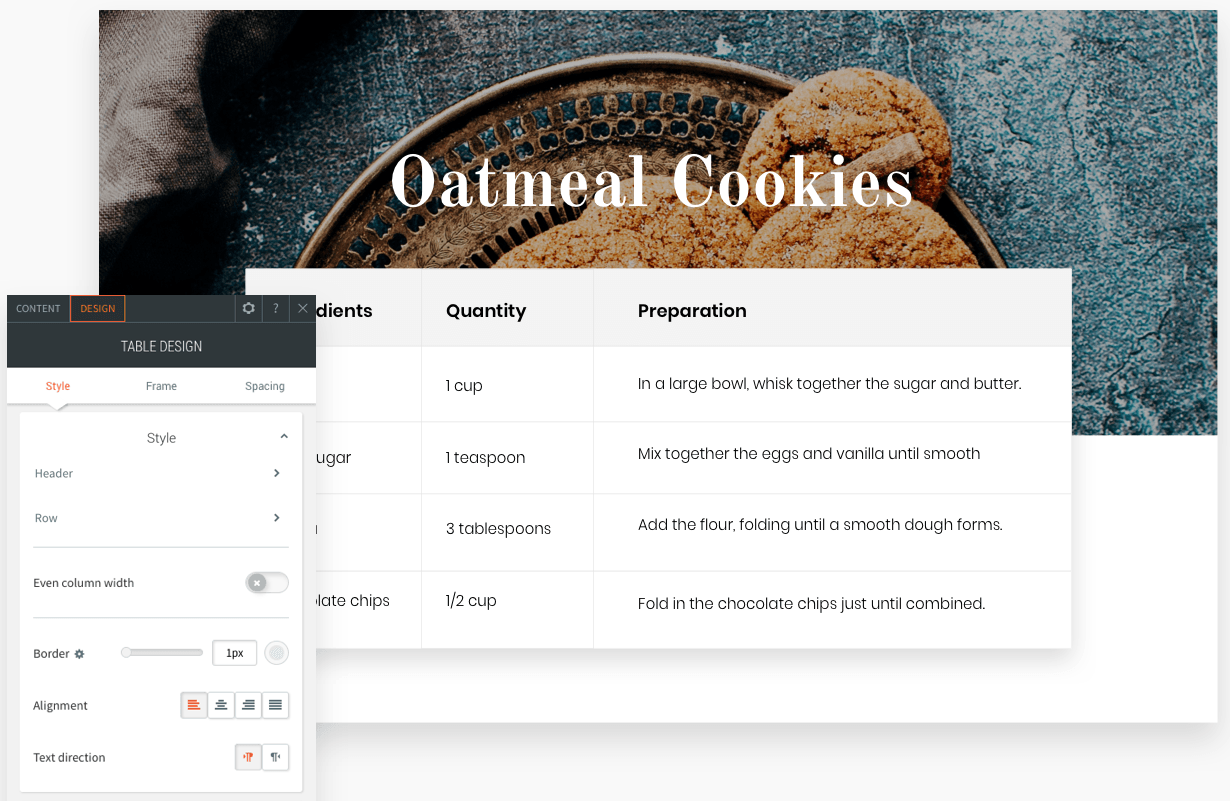
New table widget to create ingredients lists for recipes is available with NEKO360 at Northeast Kingdom Online in Vermont.

How to build this table in your site:

  1. Add 2 rows. In the first row, add a background image and title widget.
  2. In the second row, add a table widget. Add your content to the table.
  3. Set the background color of the header to gray and set the text to bold and black.
  4. Set the row background color to white and the text to black.
  5. Set the border to gray and the alignment to left.
  6. Turn on the frame shadow and set the top margin to -65px.

Having trouble editing your website? Please feel free to contact us, we are happy to help!

Email us at Support@northeastkingdomonline.com or call us at 802-473-1887
Person writing on a calendar, May 2021, on a white desk with coffee, bow tie, and other office supplies.
By Blog Owner December 1, 2025
Enable paid appointments, add multiple staff, and streamline scheduling with NEKO360’s new Bookings Software. Contact us to activate it and get expert setup help.
NEKO Website Design and Digital Marketing Agency in Vermont logo over a landscape with trees. Celebrating 15th anniversary.
By Blog+ Owner November 25, 2025
A unified managed marketing program gives businesses one team, one strategy, and real results. Improve visibility, consistency, and growth with a coordinated plan.
Computer screen displaying a website with cityscape background, pencils, and design tools.
By Blog+ Owner November 20, 2025
A custom-built website boosts visibility, performance, and trust. Discover why a fast, secure, SEO-optimized site is one of the best investments for your business.
Person using smartphone, browsing social media.
By Blog+ Owner November 17, 2025
See why Vermont businesses trust NEKO for social media management that boosts performance, saves time, and keeps your brand message clear and consistent.
Person holding a phone with an AI graphic overlay, surrounded by digital icons.
By Blog+ Owner November 14, 2025
First impressions online matter. Learn how Northeast Kingdom Online (NEKO) helps with responsive design, fast load speeds, and modern UX.
Hand holding a phone displaying a dark webpage titled
November 6, 2025
Learn how to make your Vermont business searchable in ChatGPT with simple, local SEO steps from Northeast Kingdom Online (NEKO) — your trusted digital partner
Person in suit writing
By Blog+ Owner September 22, 2025
Discover why continuing social media management in your off-season keeps your brand visible, builds trust, and sets you up for a stronger busy season.
Laptop and smartphone on a wooden surface; the phone displays a plant image on its screen.
By Blog+ Owner September 11, 2025
Discover how AI in business drives growth, boosts efficiency, and transforms customer experience to fuel digital transformation.
September 10, 2025
See how AI helps small businesses save time by automating tasks, streamlining scheduling, creating reports, and improving customer support.
A woman is sitting at a table with her head on a laptop while holding a cell phone.
August 21, 2025
Is your VT business wasting marketing efforts? Discover the top 5 common mistakes & get actionable tips from NEKO to boost your online presence in 2025.
Show More